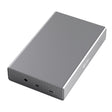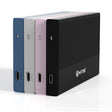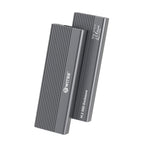



Vous avez un SSD M.2 en main (récupéré lors de la mise à niveau d'un ordinateur portable, ou acheté séparément) et vous n'êtes pas sûr qu'il rentre dans un boîtier externe avant de commander. La question est légitime : les disques M.2 existent en plusieurs longueurs et avec deux types de connecteurs, et tous les boîtiers ne les acceptent pas tous. Heureusement, seuls deux éléments déterminent si votre SSD convient, et vous pouvez le vérifier en quelques secondes.
Deux éléments déterminent si votre SSD convient
Avant d'entrer dans les détails : un SSD M.2 rentre dans un boîtier externe si deux éléments correspondent.
- La longueur : les disques M.2 existent en quatre longueurs standard.
- Le type de connecteur : l'encoche sur le connecteur (M-key ou M+B-key).
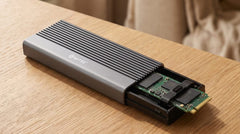
Le Switss® Boîtier SSD M.2 avec dissipateur thermique couvre tous les cas pour ces deux vérifications : « NVMe ou SATA, M-key ou M+B-key, le boîtier Switss® reconnaît les deux » (source : fiche produit en ligne). Nous passons ci-dessous les deux vérifications en revue, une par une, pour que vous puissiez contrôler vous-même si votre SSD convient.
Vérification 1 : la longueur de votre SSD (2230, 2242, 2260 ou 2280)
Les SSD M.2 n'ont pas une taille unique : ils existent en quatre longueurs, identifiées par un code à quatre chiffres : 2230, 2242, 2260 et 2280 (les deux premiers chiffres indiquent la largeur en mm, toujours 22 ; les deux ou trois derniers chiffres indiquent la longueur en mm). Le Switss Boîtier SSD M.2 prend en charge ces quatre formats (2230, 2242, 2260 et 2280) jusqu'à une capacité de 8 To (source : tableau des caractéristiques et FAQ de la fiche produit en ligne).
Où trouver le code de longueur sur votre SSD ?
Il s'agit de connaissances techniques générales, pas d'une caractéristique d'un produit Switss : le code de longueur est généralement imprimé sous forme de nombre sur la carte électronique du SSD, souvent près de l'étiquette. En cas de doute, vous le trouverez aussi dans les caractéristiques d'origine de l'ordinateur portable ou du PC dont provient le SSD.
Vous avez un SSD plus long (par exemple 22110) ?
Il existe aussi une taille plus longue, 22110 (110 mm), surtout utilisée dans les serveurs et certains ordinateurs portables professionnels. Cette longueur ne figure pas dans les caractéristiques confirmées par Switss pour ce produit : seules les longueurs de 2230 à 2280 sont confirmées. Un SSD 22110 ne rentre donc pas dans ce boîtier. En cas de doute, contactez le service client avant de commander.
Vérification 2 : le connecteur (M-key ou M+B-key) n'a pas d'importance chez Switss
En plus de la longueur, un SSD M.2 a aussi une encoche dans le connecteur : c'est le type de « key ». Une encoche indique généralement un SSD NVMe (M-key), deux encoches indiquent généralement un SSD SATA (M+B-key). Pour l'explication complète de la différence entre NVMe et SATA (vitesse comprise), lisez SSD M.2 NVMe ou SATA : quelle différence (et de quoi avez-vous besoin) ? ; ici, il s'agit uniquement de savoir s'il rentre.
La bonne nouvelle : avec le Switss Boîtier SSD M.2, cette différence n'a pas d'importance. Le boîtier reconnaît aussi bien les SSD M.2 NVMe (PCIe, la technologie plus récente et plus rapide) que les SSD M.2 SATA (NGFF, la technologie plus ancienne), en M-key ou en M+B-key (source : tableau des caractéristiques et fiche produit en ligne). Vous branchez le boîtier en USB-C 3.2 Gen 2, 10 Gbps : c'est la bande passante de la connexion elle-même, pas la vitesse à laquelle vous transférez vos fichiers (source : tableau des caractéristiques de la fiche produit en ligne).
Liste de contrôle : 3 étapes avant de commander
Pas de nouvelle explication ici : voici le résumé que vous pouvez cocher.
- Longueur vérifiée ? 2230, 2242, 2260 ou 2280 : il rentre.
- Connecteur vérifié ? NVMe ou SATA, M-key ou M+B-key : chez Switss, cela ne fait aucune différence.
- Capacité vérifiée ? Jusqu'à 8 To pris en charge (source : caractéristiques du produit).
Trois fois « oui » ? Alors votre SSD rentre dans le Switss Boîtier SSD M.2.
Votre disque n'est finalement pas un M.2 ?
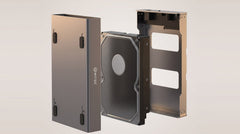
Vous avez découvert en lisant que vous n'avez pas une carte électronique étroite, mais un boîtier rectangulaire de la taille d'un paquet de chewing-gum ? Vous avez alors un disque SATA 2,5 pouces, pas un SSD M.2. Ce n'est pas un problème : ce boîtier n'est simplement pas le bon pour vous. L'article Réutiliser un ancien disque 2,5 pouces d'ordinateur portable comme disque externe vous oriente vers le bon boîtier. Vous ne savez pas encore précisément quel type de disque vous avez ? L'article Quel boîtier me faut-il pour mon ancien disque dur ? présente toutes les options.
Questions fréquentes
Comment savoir quelle est la longueur de mon SSD M.2 ?
Le code de longueur est généralement imprimé sous forme de nombre sur la carte électronique elle-même, ou figure dans les caractéristiques d'origine de l'ordinateur portable ou du PC dont provient le SSD. (Connaissances techniques générales, pas une caractéristique d'un produit Switss.)
Je vois deux encoches sur mon SSD : rentre-t-il quand même dans un boîtier M.2 ?
Oui. Deux encoches indiquent généralement un connecteur M+B-key (souvent un SSD SATA) : le Switss Boîtier SSD M.2 reconnaît aussi bien le M-key que le M+B-key.
Mon SSD est plus long que 2280 (par exemple 22110) : rentre-t-il dans le Switss Boîtier SSD M.2 ?
Non. Le boîtier accepte les SSD de 2230 à 2280 ; un SSD 22110 ne rentre pas.
J'ai un disque rectangulaire, pas une carte électronique étroite : est-ce un SSD M.2 ?
Non, il s'agit probablement d'un disque SATA 2,5 pouces, un autre format. Consultez la partie « Votre disque n'est finalement pas un M.2 ? » plus haut pour trouver le bon boîtier.
Le boîtier est-il livré avec un SSD, ou dois-je en acheter un moi-même ?
Non, le boîtier est livré sans SSD. Vous y installez votre propre SSD M.2 NVMe ou SATA ; il se fixe sans vis.
Et si mon SSD ne rentre finalement pas ?
Vous disposez alors de 30 jours pour le retourner gratuitement, avec un service client basé aux Pays-Bas.
Étape suivante
Vous êtes maintenant sûr que votre SSD rentre ? Consultez les caractéristiques et le prix actuel sur la fiche produit : Switss Boîtier SSD M.2 (18,99 €, vérifié le 24/07/2026) : un petit achat judicieux, pas un produit de luxe. Ce Switss Boîtier SSD M.2 bénéficie de 3 ans de garantie constructeur, et vous disposez de 30 jours pour le retourner gratuitement. Vous voulez voir l'installation juste après votre commande ? L'article Transformer un SSD M.2 en disque externe : étape par étape détaille chaque étape.