4K display via HDMI. Connect a monitor or TV via HDMI at 4K and 60Hz. Work at home on a large screen, without the hassle of separate adapters.


Questions about a product or your order? We usually reply within one working day.
Ask your question info@pelkonic.com

Switss® 5-in-1 USB-C Dock with M.2 SSD Enclosure
One cable to your laptop: an extra 4K display, charging up to 100W, two USB ports and a built-in M.2 SSD enclosure, all at once.
Delivery in 3 to 5 business days
Switss® 5-in-1 Dock
4K/60Hz, 100W charging and an M.2 SSD slot, one cable.
Before you order: the connections you get, how to set it up and whether it works with your laptop.
More detail
The slot takes an NVMe or SATA M.2 SSD, in sizes 2230 to 2280. The hub also has an HDMI port for a screen, a USB-C charging port, a USB-C data port and two USB-A ports.
More detail
You place your SSD in the slot and connect the hub to your laptop with the included USB-C cable. You don't need extra software (drivers). You prepare a new SSD once before first use.
More detail
It works on Windows, macOS, Linux and Android, via USB-C. The screen only works if your USB-C port carries video (DisplayPort Alt Mode). If you use the screen and SSD at the same time, the 4K screen shows 30 instead of 60 frames per second.

via every USB port and the USB-C data port
More detail
The two USB-A ports and the USB-C data port each work at up to 5 Gbps, the same bandwidth as USB 3.0. Connect a mouse, keyboard or external drive without giving up speed.
More detail
The M.2 slot works via USB-C 3.2 Gen 2, up to 10 Gbps. That means a 20 GB video project is saved to your own SSD in seconds.

More detail
Using only the external display, HDMI runs at 4K at 60Hz. Use the M.2 storage at the same time and it drops to 4K at 30Hz. You won't notice this during office work or watching videos.
4K display via HDMI. Connect a monitor or TV via HDMI at 4K and 60Hz. Work at home on a large screen, without the hassle of separate adapters.

One cable, everything ready. Plug in your laptop and your screen, storage and accessories join in instantly.

Your laptop keeps charging. The USB-C PD port delivers up to 100W while the hub is in use. Your laptop won't run out of battery while you work.

Just keeps working. The dock connects your laptop to everything you need, without you having to think about it.

All your ports within reach. Two USB-A ports and a USB-C data port, each at USB 3.0 speed, for your mouse, keyboard or other peripherals. Everything connected at once, no daisy-chaining.
More detail
The two USB-A ports and the USB-C data port each work at up to 5 Gbps, the same bandwidth as USB 3.0.

You fit an M.2 SSD directly into the device, up to 2x faster than via USB 3.0. A 20 GB video project is copied over in seconds. No separate SSD enclosure needed.
More detail
Via USB-C 3.2 Gen 2 you reach up to 10 Gbps, twice the bandwidth of the older USB 3.0 (5 Gbps). That's how a 20 GB video project is copied over in seconds.
More detail
You fit an M.2 SSD directly into the device, up to 2x faster than via USB 3.0. A 20 GB video project is copied over in seconds. No separate SSD enclosure needed.
Via USB-C 3.2 Gen 2 you reach up to 10 Gbps, twice the bandwidth of the older USB 3.0 (5 Gbps). That's how a 20 GB video project is copied over in seconds.

Use the M.2 storage and HDMI at the same time, and HDMI drops from 60Hz back to 30Hz. You won't notice this during normal office work or watching videos. If you're doing video editing where smooth scrubbing matters, use HDMI on its own.
More detail
Use the M.2 storage and HDMI at the same time, and HDMI drops from 60Hz back to 30Hz. You won't notice this during normal office work or watching videos. If you're doing video editing where smooth scrubbing matters, use HDMI on its own.

Works plug and play on Windows, macOS, Android and Linux. No drivers or software needed. Note: the 4K display only works if your USB-C port supports video signal. Check this in your laptop's specifications beforehand.
More detail
Works plug and play on Windows, macOS, Android and Linux. No drivers or software needed. Note: the 4K display only works if your USB-C port supports video signal. Check this in your laptop's specifications beforehand.
One cable to your laptop: monitor, mouse, keyboard and storage all connected at once. Your desk stays tidy.
Transfer large RAW and video files quickly via the built-in M.2 SSD. Twice as fast as USB 3.0, so no hours of waiting.
One port becomes five. Connect everything and charge at the same time, without having to choose between charging and a display.
No separate SSD enclosure needed in your bag. Dock and storage are combined in one compact device you take everywhere.

| Specification | Switss® 5-in-1 USB-C Dock (SW-51-M2) |
|---|---|
| Connection to laptop | USB-C (USB 3.2 Gen 2, video signal required for HDMI) |
| HDMI output | 4K at 60Hz (HDMI only); 4K at 30Hz with simultaneous M.2 use |
| USB-C PD charging | Up to 100W pass-through |
| USB-C data port | Up to 5 Gbps |
| USB-A ports | 2x USB-A, up to 5 Gbps each |
| M.2 SSD enclosure | NVMe and SATA M.2, sizes 2230 / 2242 / 2260 / 2280, up to 10 Gbps via USB-C 3.2 Gen 2 |
| Compatibility | Windows, macOS, Android, Linux; plug and play, no drivers |
| Package contents | Dock, USB-C cable, manual (SSD not included) |
| Warranty | 3-year manufacturer warranty |
5% off from 2 units · 10% off from 10 units applied automatically in your cart
Invoice with VAT · KvK 76439534 · VAT NL860623646B01
No. The device ships without an SSD. You fit your own M.2 SSD in the enclosure, NVMe or SATA, in size 2230, 2242, 2260 or 2280.
The enclosure works with NVMe and SATA M.2 SSDs in sizes 2230, 2242, 2260 and 2280. Check the SSD itself or its specifications to see which type it is. A 2.5 inch SATA drive does not fit in this enclosure.
Yes, you can. If you use both at the same time, the HDMI output drops from 4K at 60Hz back to 4K at 30Hz. For office work, browsing and watching videos, you'll barely notice.
Yes. The USB-C PD port delivers up to 100W pass-through. Connect your own USB-C charger to the dock's PD port, and your laptop charges while all the other ports remain in use.
Only if your USB-C port supports video signal (DisplayPort Alternate Mode). Not every USB-C port can do this. Check your laptop's manual or the manufacturer's specifications before you order.
A new or blank M.2 SSD first needs to be prepared. On Windows you do this via Disk Management, on macOS via Disk Utility. After that the SSD shows up as a normal drive and you can start saving files.
Still not sure? Ask your question and a real person usually replies within one working day.


Switss® is a Dutch brand run by two brothers, Matthijs and Luca. Send us your question and your laptop model. One of us usually replies within one working day.
These products work extra well together. Ordered once, delivered once.


€12,49incl. VAT€10,32excl. VAT
Together
€52,48incl. VAT€43,37excl. VAT
€49,87incl. VAT€41,21excl. VAT
5% combo discount, automatically applied in your cart


€29,99incl. VAT€24,79excl. VAT
Together
€69,98incl. VAT€57,83excl. VAT
€66,50incl. VAT€54,96excl. VAT
5% combo discount, automatically applied in your cart
Guide articles related to this product, with clear explanations on use and connection.

You don't manage just one workplace but several: your own office, one or more client locations, maybe a flex desk on top...

Set up a tidy home office where a single USB-C cable connects your laptop to your screen, internet, peripherals and power. Connected...

USB-C hub or docking station? A hub is compact and portable, while a dock stays in place with more power and speed....
 A Dutch brand you can rely on
Your Cart is Empty
Storage. Connection. Simplicity.
Goes well with your order
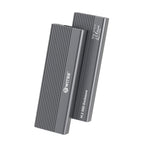
€18,99