


You're looking for a USB-C hub with an HDMI output, but most product pages only list "4K" in the specifications, without stating the refresh rate (Hz) that comes with it. That makes a real difference: 4K at 30 Hz looks noticeably less smooth than 4K at 60 Hz, especially when dragging windows or scrolling through a long page. This article lists the exact HDMI resolution and Hz of the two Switss USB-C hubs side by side, and explains what determines which combination you actually get.
What determines the resolution and Hz you get?
A USB-C hub with HDMI doesn't generate the video signal itself: it passes your laptop's video signal through to the HDMI cable. For that, your laptop needs to support DisplayPort Alt Mode: a feature that lets a USB-C port send a video signal alongside data. If your laptop doesn't support it (the specifications will often just say "USB-C for charging"), the HDMI screen stays black, no matter which hub you use.
Two things together determine what you ultimately see on screen: what your laptop can send through that USB-C port, and what the hub itself can pass through at most. The hub is the ceiling, not a guarantee: a hub rated for 4K at 30 Hz never gives you more than that, even on a laptop that could handle more on its own.
Why 4K on USB-C hubs often ends up at 30 Hz, not 60 Hz
4K at 60 Hz needs roughly twice the data bandwidth of 4K at 30 Hz. A USB-C port that sends data, charging power and sometimes a second or third display over the same cable doesn't always have that extra bandwidth available. Compact multiport hubs therefore often settle on 4K at 30 Hz: enough for sharp text, documents and most video, but noticeably less smooth than 60 Hz with fast-moving footage. Guaranteed 4K at 60 Hz is the exception for this type of compact USB-C hub, not the standard. That's a general characteristic of this kind of product, not something specific to one brand.
The two Switss hubs compared: resolution, Hz and number of screens
| Feature | Switss® 8-in-1 USB-C Hub | Switss® 12-in-1 USB-C Dockingstation |
|---|---|---|
| Video outputs | 1x HDMI | 2x HDMI + 1x VGA |
| HDMI resolution and Hz | 4K UHD (3840x2160) at 30 Hz | 4K at 30 Hz, per HDMI port |
| VGA resolution and Hz | No VGA port | 1080p at 60 Hz |
| Max. screens at once | 1 screen | 3 screens on Windows; 1 screen on macOS |
| Required on your laptop | USB-C with DisplayPort Alt Mode | USB-C with DisplayPort Alt Mode |
| Price | €11,99 (100 Mbps ethernet) or €19,99 (Gigabit ethernet) | €29,99 |
Prices checked on switss.nl, 24 July 2026.
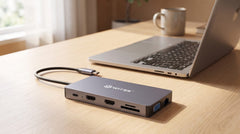
Both hubs therefore offer the same HDMI resolution and Hz: 4K at 30 Hz. The difference isn't in image quality per port, but in how many screens you can connect at once. The 8-in-1 hub has a single HDMI output for one external screen. The 12-in-1 adds a second HDMI output and a VGA output, letting you drive up to three screens at once on Windows. The VGA port stays limited to 1080p at 60 Hz, the maximum this VGA output delivers.
Would you rather have 60 Hz at 4K than more screens?
Neither hub delivers 4K at 60 Hz. Within the Switss range, a different product type does: an M.2 docking station with an HDMI output, which reaches 4K at 60 Hz as long as the built-in M.2 slot isn't used at the same time. Under simultaneous use, that product also drops back to 4K at 30 Hz. That falls outside the scope of this article about USB-C hubs; check switss.nl for the current specifications and availability.
How many screens can you connect at once?
That depends on the hub and your operating system. On Windows, the 12-in-1 hub drives up to three screens at once (2x HDMI + 1x VGA). On macOS, the same hub works for exactly one external screen, via HDMI or VGA. Apple Silicon MacBooks don't support three screens at once through the standard USB-C video function. Want this worked out in more detail, including the difference between Windows and MacBook laptops? Three screens on your laptop or MacBook: what's possible? covers that specifically.
Screen stays black? That's rarely the hub
If you connect the hub and your screen stays black, that's almost always down to the laptop, not the hub: no DisplayPort Alt Mode on that USB-C port, the wrong port used (not every USB-C port on a laptop carries video), or a setting that doesn't detect the external screen. USB-C hub and a second monitor: why doesn't it always work? walks through the most common causes step by step.
Still deciding between the 8-in-1, 12-in-1 or the 5-in-1 dock?
Resolution and Hz are only one of the deciding factors: ethernet, charging, card readers and price play a role too. 5-in-1 vs 8-in-1 vs 12-in-1: which Switss USB-C hub fits you? puts all three side by side. Connecting the hub to a laptop with two monitors on your desk? Connecting a laptop to 2 monitors: complete guide via a USB-C hub goes into that setup specifically, from cables to settings.
Frequently asked questions
Do I always get 4K if I buy a USB-C hub with HDMI?
No, that depends on your laptop. The hub passes through the maximum video signal your laptop sends over the USB-C port. If your USB-C port doesn't support DisplayPort Alt Mode, the HDMI screen stays black, no matter which hub you use.
Why is the refresh rate at 4K only 30 Hz, and not 60 Hz?
4K at 60 Hz needs roughly twice the data bandwidth of 4K at 30 Hz. On a compact USB-C hub that also sends data and power over the same cable alongside video, that extra bandwidth isn't always available. This is a general characteristic of this type of product, not something specific to Switss.
Can I get 4K at 60 Hz through a Switss product at all?
Yes, through the M.2 Docking Station 5-in-1, but only if you're not using the M.2 slot at the same time, and with one HDMI output instead of multiple screens.
Does the HDMI output also work on my MacBook?
Yes, on MacBooks with USB-C that support DisplayPort Alt Mode (tested on MacBook Air and MacBook Pro from 2018 onwards). Note: on the 12-in-1 hub, macOS works for exactly one external screen at a time, even though the hub has two HDMI outputs and a VGA output.
How much warranty do I get?
3-year manufacturer's warranty, with Dutch customer service.
Next step
Want to connect a 4K monitor over HDMI and now know what resolution and Hz to expect? Check the current specifications and price on the product page: Switss® 8-in-1 USB-C Hub for one external screen, or Switss® 12-in-1 USB-C Dockingstation for up to three screens at once on Windows.